
Buying a wireless keyboard across Europe? If the photo shows QWERTY but the listing says “German layout”, pause and check the exact wireless keyboard layout you will receive. Ask for the manufacturer’s full part number and a clear photo of the keys on that version.
This guide shows how to tell QWERTY, QWERTZ and AZERTY apart, why two keyboards called “QWERTY” can still feel different, and what to ask the seller when the photos and description disagree.
On this page
Which wireless keyboard layout is in the photo?
Look at the first six letter keys on the top letter row. QWERTY starts Q–W–E–R–T–Y. On QWERTZ the sixth key is Z. AZERTY starts A–Z–E–R–T–Y. That quick check identifies the layout family in the image.
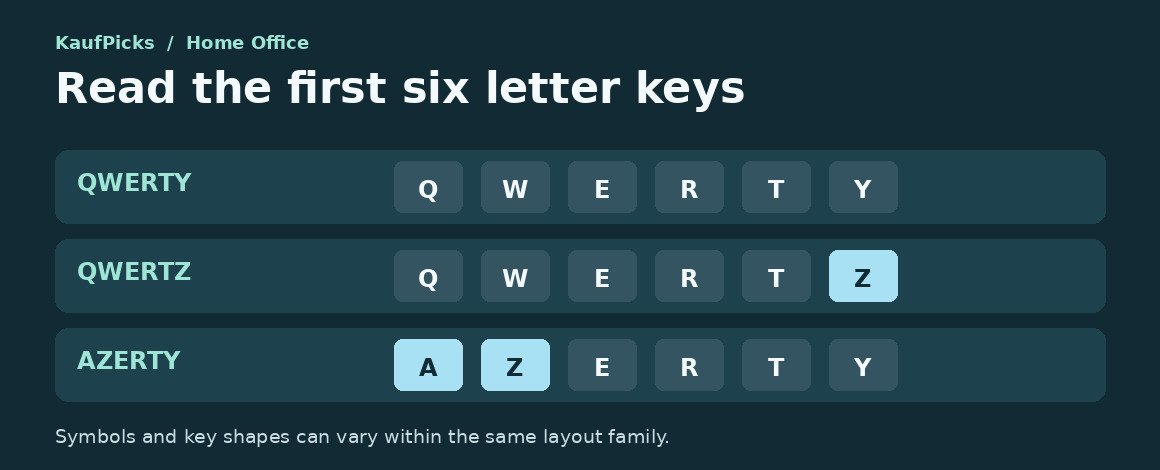
If you normally type on a UK keyboard, seeing QWERTY at the top is a starting point. Ask whether it is the UK or US version. If you want the French layout, check that the label says French or FR. A Belgian AZERTY version may put some symbols in different places. The layout family helps you narrow the search. The regional variant tells you more about the actual keys.
Use the exact part number
Manufacturers sell several regional versions under the same model name. CHERRY, for instance, lists separate article numbers for black versions of the STREAM KEYBOARD WIRELESS. Compare the complete code from the shop with the layout column in the CHERRY product table.
| Exact article number | Layout in CHERRY’s product table |
|---|---|
| JK-8550DE-2 | DE (Germany) |
| JK-8550FR-2 | FR (France) |
| JK-8550GB-2 | GB (United Kingdom) |
| JK-8550US-2 | US (USA) |
| JK-8550EU-2 | EU (US layout with a euro symbol) |
Notice the EU entry in the table. CHERRY uses that label for a US-based version with a euro symbol. Other manufacturers can use different codes. If a seller writes “EU keyboard”, ask what physical layout the manufacturer lists for that specific item. When a retailer supplies an EAN, you can use that as another cross-check against the manufacturer’s listing.
On a page with several variants, choose the wireless keyboard layout first. Then check the part number shown for the selected option. A gallery image may stay the same when the option changes. Before paying, check that the order summary records the layout you chose, especially if the product title is shared across variants.
What to check beyond the first six letters
Look at the Enter key, the keys next to the left Shift and the positions of symbols you use often, such as @, quotation marks and €. A listing photo of an ANSI keyboard can show a different Enter shape and key arrangement from an ISO keyboard in the same range. The Logitech guide to ANSI and ISO keyboards illustrates those physical differences.
If the advert shows only a front-angle image, ask for a clear photo from above. For used equipment, look closely at the lettering and ask whether the keys have stickers or have been relabelled. A stock photo may show the right design and colour while still showing a different regional version.
What Windows can change
Windows lets you choose an input layout. That setting changes the characters the computer produces when you press a key. The printed letters and the physical key shapes stay as they are. If the labels and the characters on screen disagree, compare your physical wireless keyboard layout with the input layout selected in Windows.
The Microsoft guide to keyboard layouts in Windows explains how to add a layout. If you already have more than one installed, Windows key + Spacebar cycles through them. Test a few letters and symbols in a plain text document and compare them with the markings on your keyboard.
Three practical checks before you order
1. Name the exact layout you want. Write down the regional version, such as UK QWERTY, German QWERTZ or French AZERTY. Note any symbols you use every day so you can spot their position in the photo.
2. Match the code, the listing and the photo. If they disagree, you can send this to the seller. “Could you confirm the full part number and keyboard layout of the unit you will send? Please share a clear photo of the keys from above. If this model needs a USB receiver, could you confirm it is included?” Keep the reply with the order details.
3. Check the delivery and return terms. Look up the cost of delivery to your address and the seller’s terms for returning the item. In a used or refurbished set, check what comes in the box. The keyboard, mouse and receiver may be listed separately.
Example. You live in Germany and want a UK keyboard. A listing says “German layout”, but the stock image shows QWERTY. Ask the seller for the part number and a photo of the unit you will receive. If they confirm a German version, use a listing that explicitly offers the UK version you want.
For more help checking a cross-border order, see Tips before you buy. Our Home Office product picks for Germany include affiliate offers. You can find more articles in Buying Guides.
Leave a Reply